 Web HostingCost-effective shared hosting solutions
 Reseller HostingStart your own hosting business without tech hustle
 Affiliate ProgramEarn commission by referring customers to our platforms
 cPanel HostingHosting powered by cPanel (Mostly user friendly)
 Windows HostingOptimized for windows based-applications and sites
 Domain SearchFind and register available domain names in seconds
 Email HostingProfessional email hosting for your domain (Secure, reliable, and easy to manage)
 WordPress HostingLightning-Fast, Optimized WordPress Hosting
 All DomainsExplore and register domain extensions across the world
 PH DomainsBuy trusted .ph domains tailored for Philippines businesses and individuals
 Domain Transfermove your domain to us with zero downtime and full control
 Whois LookupLook up domain ownership, expiry dates and registrar information
 SSL CertificatesSecure your website with trusted SSL Certificates for data protection and customer trust.
 .com DomainSecure the most recognized domain for global credibility
 VPS HostingScalable virtual servers. Full root access. Faster speed.
 Managed VPSNot a tech expert? Choose our fully managed VPS server.
 Dedicated ServersGet the full power and complete control of your own physical server.
 AI Websites BuilderCreate beautiful websites instantly with AI.
 Online Shop BuilderBuild a professional online shop. No coding required.
 Web Design ServiceGet a custom-designed website tailored to your brand and goals.
 BlogExplore guides on web hosting, online business, digital marketing, and more
 Contact UsReach us anytime by chat or email
 SupportFind answers and guides for all our services
Launch Your Online Store Today
With our complete eCommerce platform
Get all the tools you need to run your online business successfully

-
15+ Payment Methods
-
Mobile money payments
-
Free hosting included
-
100+ online store templates
-
Social media selling tools
-
Free business email accounts
-
Social platform connections
-
WhatsApp store integration
-
Unlimited landing pages
-
Stock tracking system
-
Product image mockups
-
Unlimited Products
-
Multiple variants (colors, sizes)
Sell Anywhere with OLITT Shop
Online Shop
Save 0%
₱
149.95
/mon
Select
₱149.95/mo when billed annually.
-
- Free hosting
- Sell Unlimited Products
- Unlimited Storage
- Connect Custom Domains
- Ticket & Live Chat support
- SEO & Marketing tools
- Social Media Integrations
- HelpDesk/Livechat Integrations
- Google Analytics
- Accept online payments
- Multiple Shipping Option Supported
- 30-day money-back guarantee
Why Choose Truehost?
-
Locally-focused and trusted by thousands of businesses in the Philippines
-
Quick customer support via phone, chat, or WhatsApp
-
Built-in hosting with reliable global servers
-
Fair pricing no hidden fees or surprise charges
-
Easy-to-use, scalable tools designed for growing businesses
-
Mobile-responsive: Your store will look great on any device phone, tablet, or computer.
-
Mobile Payments: Accept payments via card, and other popular local providers
-
Free domain name: Get a .com.ph or other local domain for your online store, free for life
How to Create Your Online Store with Olitt
1) Select your plan and set up your domain
Choose the plan that fits your needs (we recommend the Website Builder Pro plan).
You can use a domain you already own or register a new one.
2) Start building your online store
Once your account is ready, log in and open the Website Builder.
You’ll have access to all the tools you need to customize and manage your store.
3) Design Your Store
Use the simple drag-and-drop editor to:
- Add your logo, colors, and branding
- Upload product photos and descriptions
- Set prices and track inventory
- Organize with categories and menus
- Customize your page layouts and design
4) Configure Payments & Delivery
Set up your payment methods in the dashboard:
- Activate your local payments
- Add PayPal for international orders
- Enable credit/debit card payments
Set your shipping options:
Create delivery zones and pricing
Offer pickup, delivery, or courier service
5) Launch & Promote Your Store
Click Publish to make your store live. Then:
- Share your store link on social platforms
- Connect with Facebook and Instagram
- Announce your grand opening on WhatsApp
Your online business is now ready to welcome customers!
Try the Truehost eCommerce Builder for a complete solution designed for businesses in the Philippines.
Ideal For:
- Retailers (fashion, beauty, accessories)
- Freelancers (design, writing, consulting)
- Online Sellers (electronics, sneakers, vintage items)
- Social Sellers (Instagram, TikTok shops)
- Creators & Coaches
- Dropshippers (focusing on Africa and globally)
- Non-Profits (receiving online donations)
- Global Brands (exporting to diaspora customers)
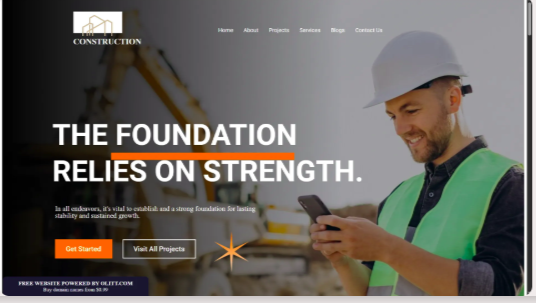
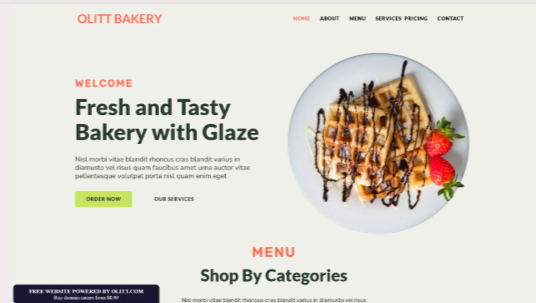
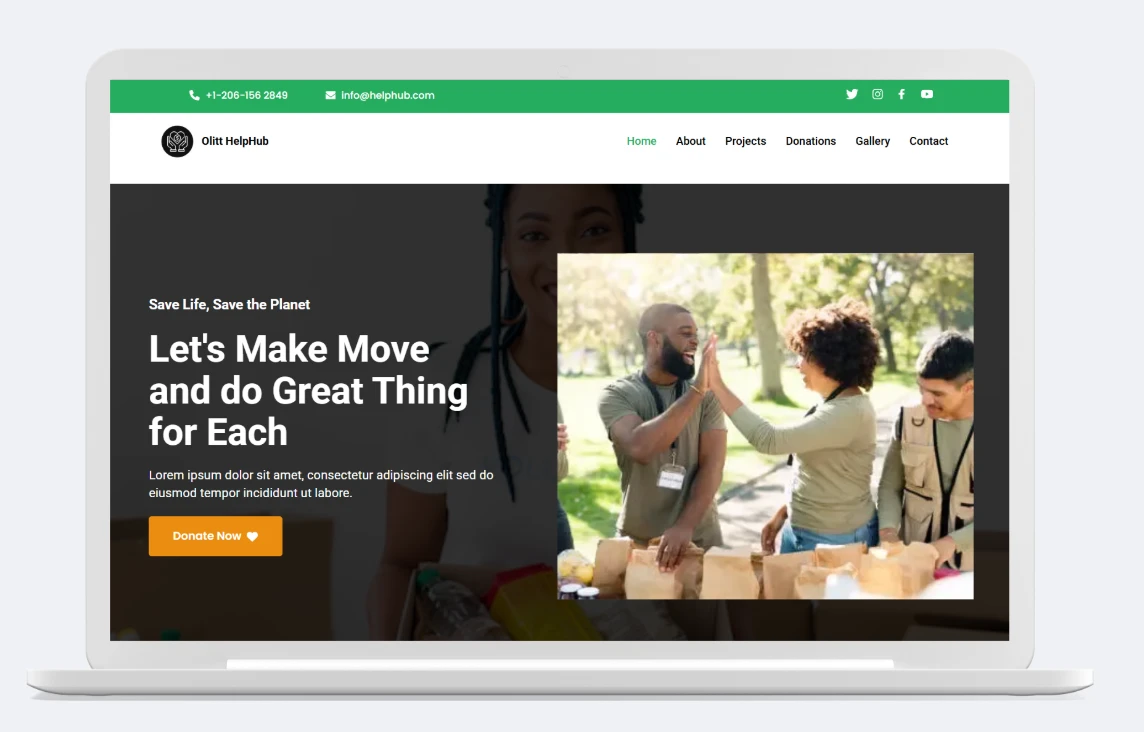
100+ Professional Templates for Every Business Need

Connect & Grow Your Business
Power up your online store with essential tools and services all managed seamlessly from your Truehost dashboard.
-
Mobile Money: Accept instant payments via mobile transfer.
-
Cards & Banking: Enable secure payments through PayPal, Stripe, and Flutterwave
-
Email Marketing: Sync customer data with Mailchimp, Sender, or ConvertKit
-
Social Commerce: Launch and manage shops on Facebook and Instagram
-
Tracking & Analytics: Monitor sales and user behavior with Google Analytics & Tag Manager
-
Customer Support: Integrate live chat and messaging via Tawk.to or WhatsApp
-
Shipping & Fulfillment: Connect with delivery partners.
-
Automation & CRM: Streamline workflows using Zapier and webhooks for orders and follow-ups
Online shop FAQs
What is an online shop?
Think of an online store as your own shop on the internet. It’s a website where you can display your products or services, and customers can browse, order, and pay for them anytime.
It’s like having a digital storefront that never closes, allowing you to connect with customers near and far.
What is an eCommerce builder?
An eCommerce builder is a simple tool that lets you create your own online store. You don’t need to know how to code or hire an expensive developer.
Everything you need is included:
- Ready-to-use website designs
- A simple way to manage your products
- A secure shopping cart for customers
- Easy payment setup
- Tools to track your orders
- Features to help with marketing
Truehost’s Online Shop Builder is one of the easiest and most affordable ways to get started, made especially for Kenyan businesses.
Why choose Truehost’s Shop Builder?
While platforms like Shopify or Wix lock you into expensive monthly USD fees, Truehost keeps it simple and local with a single, affordable payment in Philippine Pesos each year.
Here’s what sets us apart:
- Seamless Local Payments – Accept payments and credit cards
- Keep More of Your Earnings – Zero transaction fees on your sales
- Built for Filipino Businesses – Optimized for local customers and markets
- Real Local Support – 24/7 help from our team that understands Philippine e-commerce
- Everything Included – Free SSL, hosting, and business email all in one
No complications, no hidden costs. Just a smarter, more affordable way to build your online business in the Philippines.
Do I need technical skills to use the website builder?
Not at all! Our platform is made for complete beginners. With its simple drag-and-drop design and step-by-step guidance, you won’t need any coding or design experience. If you can use a smartphone, you can build your own online store.
What’s included with Truehost’s eCommerce site builder?
Our plans give you everything you need to start selling:
- Full access to our online shop builder
- A free domain name
- Secure web hosting
- SSL security certificate
- Easy-to-use website builder
- Professional business email
What can I sell in my online store?
You can sell just about anything! Our platform is built to handle:
- Physical products like fashion, accessories, and electronics
- Digital goods including e-books, courses, and templates
- Services such as coaching, consulting, or freelance work
- Subscriptions for recurring memberships or content
Your store can be set up for different product types, delivery methods, and payment options all tailored to what you offer
Will my online store work well on mobile phones?
Absolutely.
Every online store built with Truehost is automatically mobile-friendly. Your shop will look perfect and work smoothly on any device—whether your customers are using a smartphone, tablet, or computer.
This is built-in and essential, since most shoppers in the Philippines browse and shop using their mobile devices.
Can I connect my shop to social media?
Definitely. You can easily:
- Add a WhatsApp chat button for customer questions
- Link directly to your Facebook, Instagram, and TikTok profiles
- Display your products on Facebook and Instagram shops
- Add tracking for Facebook and Google ads
This makes it simple to reach more customers and bring more visitors to your store.store.
How soon can I launch my website?
You can have a simple, one-page website up and running in less than an hour. If you use our AI Builder, it’s even faster just tell us about your business and customize the content it creates for you.
How to Choose the Right Website Builder for Your Filipino Business?
With so many website builders available, choosing the best one for your needs is key. If you’re unsure where to start, here are the most important factors to consider for your business in the Philippines:
Ease of Use: Look for a builder that is simple and intuitive. If you can navigate Facebook or Shopee, you should be able to build your site without any technical headaches.
Affordable Pricing: The right builder fits your budget. Look for transparent, all-in-one pricing in Philippine Pesos without hidden fees.
Essential Features: Choose a platform that has everything you need built-in, like payment gateways for GCash, Maya, and credit cards, along with easy-to-use design tools.
Local Support: Opt for a builder that offers reliable, local customer support. Having a team that understands the Philippine market and is available to help you is invaluable.
Data Ownership: Your content is your business. Ensure you retain full ownership of your data and can move it if needed.
We recommend starting with a free trial or the most affordable plan from a trusted builder like Olitt from Truehost. Test it out with no obligation, and you’ll quickly see if it’s the right fit for growing your business.
What are the Advantages of Using a Website Builder?
Website builders are designed to make getting online simple and affordable. Here are the key benefits:
It’s Fast and Easy
You don’t need to be a tech expert. With drag-and-drop tools and pre-designed templates, you can create a professional-looking website in hours, not weeks.
It’s Cost-Effective
Building a site with a developer can be expensive. A website builder gives you all the essential tools for a low, predictable cost, saving you money.
You’re in Control
Make updates anytime you want add new products, change your prices, or update your content instantly, without waiting for a developer.
Built for Your Needs
Modern website builders come with everything included: hosting, security (SSL), and mobile-friendly designs that look great on any device.
In short, a website builder gives you a faster, cheaper, and simpler way to build and manage your own online presence.make a purchase, but there’s no cost or obligation to try out a free version first.
Should I Build My Website from Scratch or Use a Website Builder?
When creating a professional website, you have two main paths: coding it yourself or using a website builder. Each option has its own strengths and trade-offs. Here’s a simple breakdown to help you decide:
Coding Your Own Website
Pros:
- Full control over design and functionality
- Ability to build custom features and make changes anytime
- No reliance on third-party tools or templates
Cons:
- Time-consuming, especially without coding experience
- Requires ongoing maintenance, updates, and security management
- You’re responsible for fixing any issues that come up
Using a Website Builder
Pros:
- No coding skills needed create a professional site quickly
- Choose from a variety of ready-made templates
- Hosting and domain support often included
- Many include built-in eCommerce tools for selling online
Cons:
- Some plans may have hidden fees, so review terms carefully
For most business owners, creators, and beginners in the Philippines, a website builder offers a faster, simpler, and more affordable way to build and launch a site without the technical hassle.igning up for a website builder, as some fees can be hidden.
What’s the Difference Between a Website Builder and a Page Builder?
While both let you design visually, they’re made for different situations:
| Feature | Website Builder | Page Builder (like Elementor) |
|---|---|---|
| What You Build | A complete website | One page at a time, inside WordPress |
| Hosting Included | Yes | No you arrange it separately |
| Domain & SSL | Simple, one-click setup | Manual setup required |
| Ease of Use | Made for beginners | Requires some WordPress know-how |
| Best For | Small businesses, entrepreneurs, and non-tech users | Web designers, developers, or WordPress users |
Do I really need a website builder to create a website?
Not necessarily but it’s by far the easiest way to get started.
You could code everything yourself using HTML, CSS, and JavaScript. Or try building with WordPress, though that still involves setup, plugins, and some technical know-how.
A website builder simplifies everything:
- Create your site visually with simple drag-and-drop
- Hosting, design, and layout are all handled for you
- Launch your website in hours instead of weeks
- No coding or technical experience required
If you want to get online quickly, easily, and affordably, a website builder is your best choice..
Do I need to pay taxes when selling online in the Philippines?
Yes. If you are selling goods or services online in the Philippines, you are required to report your income and pay the appropriate taxes to the Bureau of Internal Revenue (BIR). This applies whether you sell on platforms like Lazada or Shopee, or through your own website.
How can I promote my online store in the Philippines?
Getting the word out about your store is key to attracting customers and growing your business. Here are some effective ways to promote your online store in the local market:
- Run special promotions like discounts or free shipping to encourage first-time purchases
- Leverage social media by regularly posting engaging content, photos, and direct links to your products
- Create helpful content through blog posts or videos that showcase your products and their benefits
- List your store in local online directories and relevant business platforms
- Join online communities related to your niche to connect with potential customers
- Optimize for search engines by using relevant keywords, creating quality content, and ensuring your site loads quickly
These strategies can help you reach more customers and build a strong online presence for your Filipino business.